Get AI Headshots From a Selfie
Upload one selfie. Get a headshot that works for LinkedIn, a resume, or a job application in under a minute, no studio, no lighting kit, no forced corporate smile.
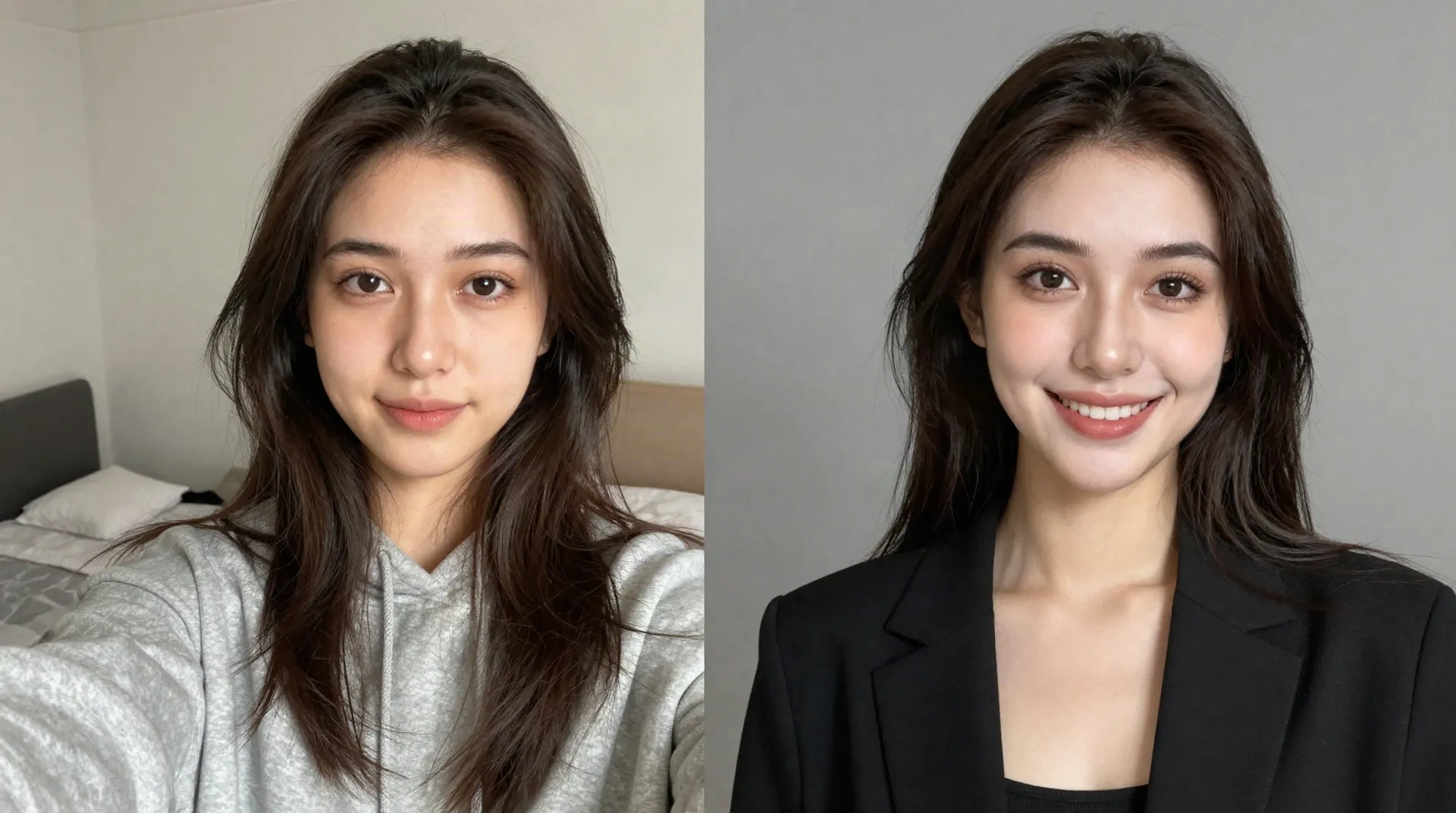
What the AI headshot style actually does
One selfie in, one headshot out
No photographer, no ring light, no reshoot because you blinked. Upload the selfie you already have on your phone.
Doesn't flatten your face
A lot of headshot generators output the same beige-backdrop mannequin. This keeps your actual features and just fixes the lighting and background.
Under a minute
No queue, no waiting on a studio slot next week. You'll have a usable headshot before your coffee's done.
180+ styles, a few built for this
Facetopia's whole catalog isn't just fun filters. A handful of styles are tuned specifically for LinkedIn, resumes, and profiles that need to look put together.
Regenerate until it's right
Free plan includes 10 transforms a day, so you can try a few angles or expressions instead of settling for the first result.
Honest about the rough edges
Glasses sometimes pick up a faint glow around the frame. We'd rather tell you now than have you notice it after you've already posted it.
How the headshot style works
Three steps, no appointment.
-
1
Upload your selfie
Front-facing, decent lighting, no sunglasses. That's the whole ask.
-
2
Pick the headshot style
Out of the 180+ styles in the catalog, choose the one built for professional shots, not the anime one.
-
3
Download and use it
Straight to your camera roll. Use it on LinkedIn, a resume, or wherever needs a photo that doesn't look like a bathroom mirror selfie.
Built for the moments a selfie won't cut it
Job hunting, internships, a LinkedIn profile you're finally taking seriously, a portfolio site that needs one normal photo among the chaotic ones. The AI headshot style exists for the moment you need to look like you have your life together, even if the rest of your camera roll says otherwise.
- LinkedIn and job applications
- Freelance and portfolio profiles
- Team pages and About sections
- The one dating app photo your friends keep asking about
What people say after trying the headshot style
I needed a LinkedIn photo about ten minutes before an interview. This was faster than finding a wall in my apartment with decent lighting.
Every other headshot generator made me look like a stock photo. This one still looked like my actual face, just less tired.
Used it for my resume and my LinkedIn on the same day. Nobody asked why my professional photo and my Instagram looked like the same person, which is apparently rare.
Pricing
The headshot style works on both plans.
Free
for trying the headshot style
- 10 transforms a day
- Access to the full 180+ style catalog
- Includes the headshot style
- Standard resolution download
Pro
for job hunts and heavier use
- Unlimited transforms
- Full 180+ style catalog
- HD download, no watermark
- Priority processing when new styles drop
Common questions about AI headshots
Are AI headshots actually good enough for LinkedIn?
How is this different from hiring a real photographer?
Will it work if I wear glasses?
Does it work as well on darker skin tones as lighter ones?
Can I use the free plan for this?
What's the difference between the headshot style and the other 180+ styles?
Do I need a professional photo to start with?
Can I use the headshot for a company team page?
Turn your selfie into a headshot
Free plan included. Ten transforms a day, no card needed.